Forge
The control plane — the browser app where you compose agents, run tickets, inspect evidence and approve production actions.
Forge turns a production request — a Jira ticket, a character, an offer — into grounded, validated, auditable work, run by autonomous agents that a human approves before anything ships. This page assumes no prior knowledge of agents, pipelines, RAG or AI systems.
The idea
Game production is full of repetitive, multi-tool, error-prone work: pull source art from Perforce, run Photoshop actions, wire sprites and metadata in Unity, set up character data, package an offer, validate, commit, update Jira. Done by hand it is slow, inconsistent, and easy to get subtly wrong.
An agent executes the real tools, grounds every value in a real source, validates the result, and holds for a human sign-off before any outward effect. You get the speed of automation with the accountability of a reviewed change.
The control plane — the browser app where you compose agents, run tickets, inspect evidence and approve production actions.
The engine beneath it — grounds, reasons, decides, executes through real tools, and records everything.
JSON-defined production workflows. New work becomes a new agent on the same engine — not a new tool.
Choose your path
The wiki is organised for two audiences. Pick the track that matches why you're here — the left sidebar mirrors these two groups.
For producers, artists, designers, QA, agent authors and operators. Learn what Forge does and how to run it: run a ticket, compose and certify agents in Studio, follow a pipeline end-to-end, handle incidents, talk to Weave, wire up connectors and skills, and manage access.
For engineers, technical artists, platform owners and architects. Learn how Forge is built: the layered architecture, the Fabric engine (capability routing local↔cloud, dual-mode RAG, the optimization pipeline), the governed 17-state engine, deployment profiles, the ADRs and the full diagram set.
Not sure? Leadership and newcomers should read What Forge is first — it maps the whole platform and its boundaries in a few minutes.
Positioning
A script encodes one path and breaks on the next edge case. A Forge agent grounds each value in a live source and reports what it could not resolve instead of guessing.
Scripts run and hope. Forge previews reads/writes, validates, and requires a human sign-off before outward effects — with a full audit trail.
Rule-based automation moves data between apps. Forge reasons over production context (RAG + knowledge) to decide what to do, then executes real native-tool work.
Each new production vertical is a new agent on the same runtime — Tech Art (3 live, more rolling out) is live today; Design and Dev (the governed bug-fix engine) are in development; Production, QA, Product and Art are scaffolded next (7 verticals in all).
A chat assistant answers; Forge acts. Deterministic logic runs first; AI is used only where it adds value, always grounded, and it never decides whether a production gate passed.
Weave is read-only. Models are a replaceable capability behind a contract — you request a lane (fast/reason/code/…), routed to a local model or, for reason/code, a cloud specialist under budget; swap the model and nothing above it changes.
Together
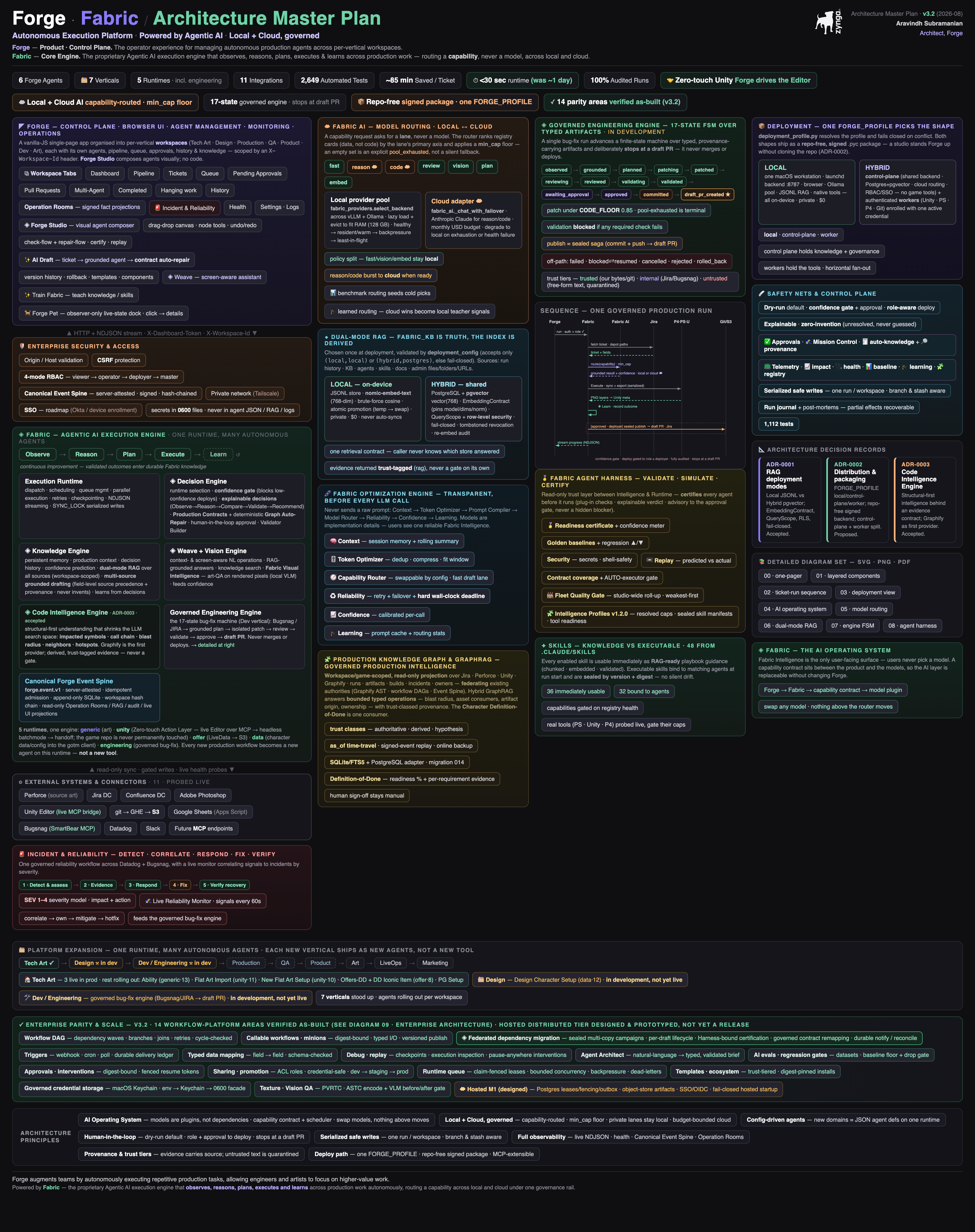
You describe intent in Forge. Fabric observes and grounds it, reasons and plans, executes through the right runtime and connectors, and streams progress back live. Governance (validation, confidence, approval) sits between the plan and any outward effect; resilience (journal, health, post-mortems) records everything so a crash never hides partial work.
Guided tour
Each production vertical (Tech Art, Design, …) has its own agents, history, queue and knowledge. Integrations (Jira, Perforce, Unity, Git) are shared.
The Connections view shows Jira, Perforce, Unity, Photoshop, Git and AI status. Green means ready.
Preview grounds the ticket and shows the plan, reads and proposed writes — no live mutation.
Every value carries its source; confidence and validators explain readiness. Unresolved values stay explicit.
Review the exact evidence. Accept, deny/request changes, or ignore neutrally; then prepare a separate sealed publication approval for outward effects such as commit/push, Sheets/S3 and Jira transitions.
Vocabulary
A production vertical with isolated agents, history, queue, knowledge and model pins; integrations stay shared.
A JSON-defined production workflow. Its runtime selects the engine; dynamic_subagents only controls fan-out.
One of five execution engines: generic (art), unity (zero-touch Action Layer), offer (LiveData → S3), data (character setup), engineering (governed bug-fix).
A unit of work such as Observe, Transform, Validate, Approval or Publish. A stage is a capability inside an agent definition.
Binding a value to a real source (ticket, sheet, Perforce, wiki) and recording where it came from — never invented.
Confidence summarizes evidence; it never overrides a hard validation or policy failure. Outward effects need a human sign-off.
The read-only trust layer that validates, simulates and certifies an agent before it runs.
A deterministic, read-only check of whether a character’s required artifacts actually exist — evidence owns the verdict.